TL;DR
- Microsoft Teams Rooms work best for companies already using Microsoft 365.
- Zoom Rooms offer a simple meeting experience across different platforms.
- BYOD is the lowest-cost option but depends on users bringing and managing their own laptops.
- The right choice depends on your office size, meeting frequency, IT support, and collaboration needs.
- This guide compares features, costs, hardware, security, and real-world UAE office use cases.
Teams Rooms vs Zoom Rooms vs BYOD: What Is the Biggest Difference?
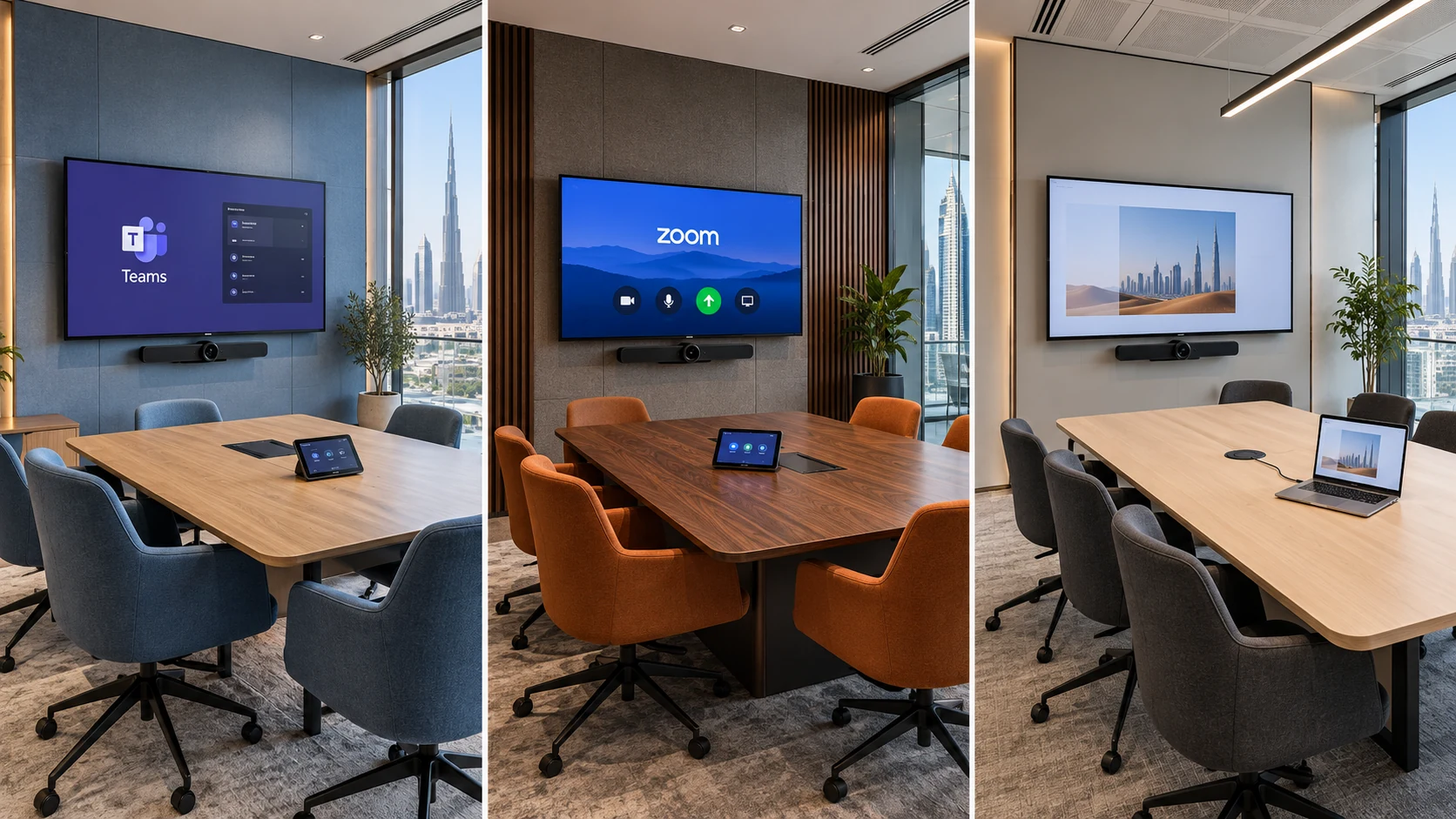
Microsoft Teams Rooms
A Microsoft Teams Room is designed for organizations that rely on Microsoft Teams every day. Everything, from scheduling to joining meetings, is integrated into Microsoft 365.
Employees enjoy a consistent meeting experience across every conference room.
Zoom Rooms
Zoom Rooms focus on making Zoom meetings quick and simple.
Many companies choose Zoom because external partners, suppliers, and clients already use it. The interface is straightforward, and users usually need very little training.
BYOD
BYOD gives users complete flexibility.
One employee may start a Zoom meeting, another may use Microsoft Teams, while someone else may open Google Meet. The room hardware simply acts as external audio and video equipment.
This flexibility is useful for smaller businesses, although meeting quality often depends on the user’s laptop, operating system, and USB connections.
What Are Microsoft Teams Rooms, Zoom Rooms, and BYOD?
What Is a Microsoft Teams Room?
- Room computer
- Touch controller
- Conference camera
- Ceiling or table microphones
- Speakers
- One or two displays
Best suited for
- Large enterprises
- Government offices
- Corporate headquarters
- Financial institutions
- Businesses using Microsoft 365 daily
What Is a Zoom Room?
A Zoom Room is a dedicated video conferencing system built around Zoom software and certified room hardware.
Instead of launching Zoom from a laptop, the meeting room itself runs Zoom.
A standard zoom conference room normally includes:
- Touch controller
- PTZ or AI-powered camera
- Professional microphones
- Ceiling or wall speakers
- One or two meeting displays
The zoom room controller gives users one-touch meeting controls, room scheduling, screen sharing, participant management, and camera adjustments.
Many businesses choose zoom rooms because employees and external guests often already use Zoom, making meetings familiar and easy to join.
Best suited for
- Companies working with international clients
- Training centres
- Consulting firms
- Sales teams
- Hybrid workplaces
What Is BYOD?
- USB conference camera
- Speakerphone
- Display
- HDMI or USB-C connection
- Wireless presentation system (optional)
How Does Each Meeting Room Work?
The biggest operational difference between these systems is how users start meetings.
| Feature | Microsoft Teams Room Zoom Room BYOD |
|---|---|
| Dedicated room computer | Yes Yes No |
| Personal laptop required | No No Yes |
| One-touch meeting join | Yes Yes No |
| Room calendar integration | Yes Yes Limited |
| Professional room controls | Yes Yes Depends on laptop |
| Supports multiple meeting apps | Limited Limited Yes |
A teams conference room feels more like an appliance. Users enter the room, tap the controller, and begin the meeting.
A zoom conference room follows a similar approach but is built around the Zoom platform.
BYOD offers greater flexibility because users can run almost any conferencing application. The trade-off is that every meeting starts with connecting and configuring a laptop.
Which Hardware Does Each Solution Require?
Microsoft Teams Room Hardware
- Teams Room compute system
- Touch control panel
- AI conference camera
- Ceiling or tabletop microphones
- Professional speakers
- Meeting room display
- Optional scheduling panel outside the room
Zoom Room Hardware
- Zoom Room appliance or mini PC
- Zoom room controller
- Conference camera
- Audio DSP
- Ceiling microphones
- Meeting room displays
- Scheduling display
BYOD Hardware
- USB camera
- USB speakerphone
- Display
- HDMI cable
- USB-C dock
- Wireless sharing device
Which Option Is Easier for Employees?
- Connect HDMI
- Connect USB
- Select the correct microphone
- Select the correct speaker
- Choose the correct camera
- Launch the meeting application
Teams Rooms vs Zoom Rooms vs BYOD: Feature Comparison
The right choice depends on how your employees work every day. If your business already relies on Microsoft 365, a Microsoft Teams Room often provides the smoothest experience. If most client meetings happen on Zoom, a Zoom Room is usually the better fit. BYOD is the most flexible option, but it also requires more effort from users.
The table below highlights the main differences.
| Feature | Microsoft Teams Room | Zoom Room | BYOD |
|---|---|---|---|
| One-touch meeting join | ✓ | ✓ | × |
| Dedicated room computer | ✓ | ✓ | × |
| Works without a laptop | ✓ | ✓ | × |
| Supports wireless content sharing | ✓ | ✓ | Depends on hardware |
| Central device management | ✓ | ✓ | Limited |
| Outlook calendar integration | ✓ | Limited | Depends on user |
| Multiple meeting platforms | Limited | Limited | ✓ |
| User training required | Low | Low | Medium |
| Initial investment | Higher | Higher | Lower |
| Long-term consistency | Excellent | Excellent | Moderate |
Which Solution Offers Better Video and Audio Quality?
Microsoft Teams Rooms
A Microsoft Teams Room supports professional meeting hardware certified by Microsoft.
Common features include:
- AI-powered speaker tracking
- Auto-framing cameras
- Dual-screen support
- Noise suppression
- Echo cancellation
- Intelligent speaker recognition on supported devices
In medium and large meeting spaces, these features help remote participants see and hear everyone more clearly.
Zoom Rooms
- Intelligent camera framing
- Multi-camera support
- HD video conferencing
- Automatic participant framing
- Digital whiteboarding
- Wireless presentation
BYOD
BYOD meeting quality depends almost entirely on the user’s laptop and the connected peripherals.
If an employee has:
- An older laptop
- Poor USB drivers
- Incorrect audio settings
- Outdated conferencing software
Meeting quality can suffer, even when the room has good cameras and microphones.
For small meeting rooms, this may not be a major issue. For executive boardrooms, it often becomes noticeable.
Which Option Is Easier to Manage?
Managing a Microsoft Teams Room
A teams room device can be monitored remotely through Microsoft’s management tools.
IT administrators can:
- Push software updates
- Monitor device health
- Restart systems remotely
- View room usage
- Detect hardware issues before meetings
This reduces downtime across multiple office locations.
Managing Zoom Rooms
Zoom also provides centralized administration.
IT teams can:
- Update room software
- Manage permissions
- Configure controllers
- Monitor room availability
- Review device status
Businesses with several UAE offices often appreciate being able to manage every meeting room from one dashboard.
Managing BYOD Rooms
BYOD offers very little centralized control.
Instead, IT teams often troubleshoot:
- Laptop compatibility
- USB connection issues
- Driver conflicts
- Display settings
- Camera permissions
Support requests usually increase because every employee’s device is different.
Security Comparison
Microsoft Teams Rooms Security
A Microsoft Teams Room benefits from Microsoft’s enterprise security ecosystem.
Features include:
- Microsoft Entra ID authentication
- Conditional Access policies
- Multi-factor authentication
- Microsoft Defender integration
- Enterprise device management
Organizations already using Microsoft 365 can apply existing security policies to their meeting rooms.
According to Microsoft’s security documentation, Teams Rooms are designed to follow the same identity and device management framework used across Microsoft 365 environments.
Zoom Rooms Security
Zoom Rooms include enterprise-grade security features such as:
- Waiting rooms
- Passcodes
- Encryption for meetings
- Administrative controls
- User authentication
- Device management
Zoom has continued strengthening its security features following major platform updates introduced over recent years.
BYOD Security
BYOD security depends on employee devices.
Potential risks include:
- Unpatched laptops
- Personal applications
- Public Wi-Fi usage
- Outdated operating systems
- Unauthorized software
Businesses with strict compliance requirements usually implement additional endpoint security policies if they choose BYOD.
Cost Comparison
The total cost is more than just hardware. Licensing, maintenance, and support all affect the long-term investment.
| Cost Area | Microsoft Teams Room | Zoom Room | BYOD |
|---|---|---|---|
| Hardware | High | High | Low |
| Installation | Medium | Medium | Low |
| Room controller | Included | Included | Not required |
| Maintenance | Low | Low | Medium |
| IT support | Low | Low | Higher |
| User training | Low | Low | Medium |
Which Option Scales Better for Growing UAE Businesses?
Microsoft Teams Rooms
If a company plans to equip:
- Dubai headquarters
- Abu Dhabi office
- Sharjah branch
- Remote collaboration spaces
A Microsoft Teams Room allows consistent hardware, software, and user experience across every location.
Employees know exactly how each meeting room works.
Zoom Rooms
Zoom Rooms also scale well across regional offices.
Organizations with international customers often choose Zoom because external participants are already familiar with the platform.
This consistency reduces meeting delays and user confusion.
BYOD
- Cameras
- USB hubs
- Displays
- Laptop docks
- Wireless presentation devices
Which System Is Best for Different Room Sizes?
| Room Type | Microsoft Teams Room | Zoom Room | BYOD |
|---|---|---|---|
| Huddle room | ✓ | ✓ | ✓ |
| Small meeting room | ✓ | ✓ | ✓ |
| Medium conference room | ✓✓ | ✓✓ | Limited |
| Large boardroom | ✓✓✓ | ✓✓✓ | Not recommended |
| Training room | ✓✓ | ✓✓✓ | Limited |
| Executive meeting room | ✓✓✓ | ✓✓✓ | Rarely used |
For larger meeting spaces, dedicated room systems provide more reliable audio coverage, better camera performance, and easier meeting control.
Which Solution Fits Different UAE Industries?
| Industry | Recommended Solution | Why |
|---|---|---|
| Corporate offices | Microsoft Teams Room | Strong Microsoft 365 integration |
| Government | Microsoft Teams Room | Centralized management and security |
| Education | Zoom Room | Easy virtual classroom management |
| Healthcare | Microsoft Teams Room | Enterprise administration and compliance options |
| Real estate | BYOD or Zoom Room | Flexible client presentations |
| Consulting | Zoom Room | Frequent external meetings |
| Startups | BYOD | Lower upfront investment |
How Do You Choose the Right meeting room solution?
- Which platform do employees use every day?
- How often do external clients join meetings?
- How many conference rooms need to be equipped?
- Does your IT team manage meeting room devices?
- Will your business expand to additional UAE offices?
Which Solution Is Best for Small Businesses?
For businesses with one or two meeting rooms, keeping costs under control is often the priority.
Choose BYOD if:
- Your budget is limited.
- Employees use different meeting platforms.
- Meetings are occasional.
- You don’t mind connecting a laptop before every meeting.
Choose a Microsoft Teams Room if:
- Your company already uses Microsoft 365. .
- Most meetings happen on Teams.
- Employees book rooms through Outlook.
- You want a consistent meeting experience.
Choose a Zoom Room if:
- Most meetings are hosted on Zoom..
- Clients already use Zoom.
- Your staff frequently collaborate with international partners.
- Simplicity is a priority.
A zoom room controller makes it easy for anyone to start or manage meetings without technical knowledge.
Which Solution Is Best for Medium-Sized UAE Offices?
As companies grow, meeting rooms become busier, and reliability becomes more important.
For offices with 50 to 300 employees:
Microsoft Teams Room
A teams conference room works well when:
- Every department uses Microsoft Teams.
- Employees reserve meeting rooms throughout the day.
- IT wants centralized management.
- Hybrid work is common.
Dedicated room systems reduce delays caused by cable connections or laptop compatibility issues.
Zoom Room
- Sales teams meet international customers.
- Training sessions happen regularly.
- Webinars are part of daily operations.
- Client experience matters.
BYOD
- Informal collaboration spaces
- Creative brainstorming rooms
- Temporary meeting spaces
Which Solution Is Best for Enterprise Offices?
Large organizations usually prioritize consistency, security, and centralized management.
A dedicated Microsoft Teams Room or Zoom Room is generally the better long-term investment.
Enterprise businesses often require:
- Standardized room layouts
- Remote monitoring
- Central software updates
- Professional audio systems
- High-quality video conferencing
Managing dozens of BYOD rooms across multiple locations becomes much more difficult.
Common Mistakes Businesses Make
Many organizations focus only on hardware costs and overlook long-term usability.
Avoid these common mistakes:
Buying Hardware Before Choosing a Platform
Decide whether Microsoft Teams or Zoom will be your primary collaboration platform before purchasing cameras or controllers.
Ignoring Room Size
A camera that works well in a small meeting room may not provide enough coverage in a large boardroom.
Always match hardware to the room dimensions.
Forgetting About Audio
- Ceiling microphones
- Table microphones
- Echo cancellation
- Proper speaker placement
Underestimating Cable Management
- Cable routing
- Table connection hubs
- Power management
- Hidden wiring
Skipping User Training
- Joining meetings
- Sharing content
- Using room controllers
- Switching cameras
- Muting microphones
How to Future-Proof Your Meeting Rooms
- AI-powered cameras
- Automatic speaker tracking
- Wireless content sharing
- Cloud device management
- Dual-display support
- Firmware updates
- Expansion for additional microphones
Meeting Room Buying Checklist
- How many meeting rooms will be equipped?
- What is your available budget?
- Do you need centralized IT management?
- Will external clients join meetings frequently?
- Do you require Outlook calendar integration?
- What size are your meeting rooms?
- Can the system scale as your business grows?
- Is the chosen hardware certified for your preferred platform?
Expert Recommendation
If your business already relies on Microsoft 365 for communication and scheduling, a Microsoft Teams Room is often the most practical choice. It integrates naturally with existing workflows and provides a consistent experience across meeting spaces.
If client meetings are primarily hosted on Zoom, a Zoom Room delivers a familiar interface and reliable conferencing features that external participants already know how to use.
BYOD remains a sensible option for startups, small offices, and businesses with occasional meetings. It offers flexibility and a lower upfront investment, though it may require more user involvement and IT support over time.
Final Thoughts
If your organization is comparing Teams Rooms vs Zoom Rooms, begin by looking at the platform your employees already use. Building around familiar software reduces training, simplifies support, and creates a more consistent meeting experience.
A Microsoft Teams Room is a strong fit for companies invested in Microsoft 365, Outlook, and Teams. A Zoom Room works well for businesses that collaborate regularly with external clients or international partners through Zoom. BYOD remains a practical choice for smaller offices, temporary collaboration spaces, or organizations looking to minimize initial costs.
Beyond the platform itself, consider room size, meeting frequency, hardware quality, security requirements, and long-term maintenance. Selecting the right combination of cameras, microphones, displays, and certified room devices will have a greater impact on meeting quality than software alone.
Taking the time to evaluate your current workflows now can help avoid costly upgrades and compatibility issues in the future.
Frequently Asked Questions
What is the difference between Teams Rooms vs Zoom Rooms?
The main difference between Teams Rooms vs Zoom Rooms is the collaboration platform they are built around. A Microsoft Teams Room is designed for organizations using Microsoft Teams and Microsoft 365, while Zoom Rooms are optimized for businesses that rely on Zoom for daily meetings. Both provide dedicated meeting room hardware and one-touch meeting controls.
Can a Microsoft Teams Room join Zoom meetings?
Yes. A Microsoft Teams Room can join many third-party meetings, including Zoom, through features such as Direct Guest Join or supported interoperability options. The available functionality depends on the room hardware, software version, and administrator configuration.
Is BYOD better than a dedicated meeting room system?
BYOD is a good choice for businesses with limited budgets or occasional meetings. However, dedicated systems such as a teams room or zoom room usually provide a more consistent experience, faster meeting start times, and simpler management for IT teams.
What hardware is required for a Teams Room?
A typical teams room device includes:
- A certified room computer or appliance
- Touch controller
- Conference camera
- Microphones
- Speakers
- One or two displays
Additional accessories, such as scheduling panels or ceiling microphones, can be added for larger meeting spaces.
Which solution is best for UAE offices?
There is no universal answer.
- Choose a Microsoft Teams Room if your organization already uses Microsoft 365 and Teams.
- Choose Zoom Rooms if Zoom is your primary collaboration platform.
- Choose BYOD if flexibility and lower upfront costs are more important than dedicated room features.
The best option depends on your existing software, meeting frequency, room size, and IT resources.