TL;DR
- BYOD vs BYOM comes down to who controls the meeting, the user or the room.
- A BYOD meeting room depends on the employee’s laptop for conferencing.
- BYOM lets users bring any meeting platform while using the room’s professional AV equipment.
- BYOD costs less to deploy, while BYOM provides a better meeting experience.
- The right choice depends on your meeting rooms, collaboration tools, and future growth.
What Does BYOD Mean in a Meeting Room?
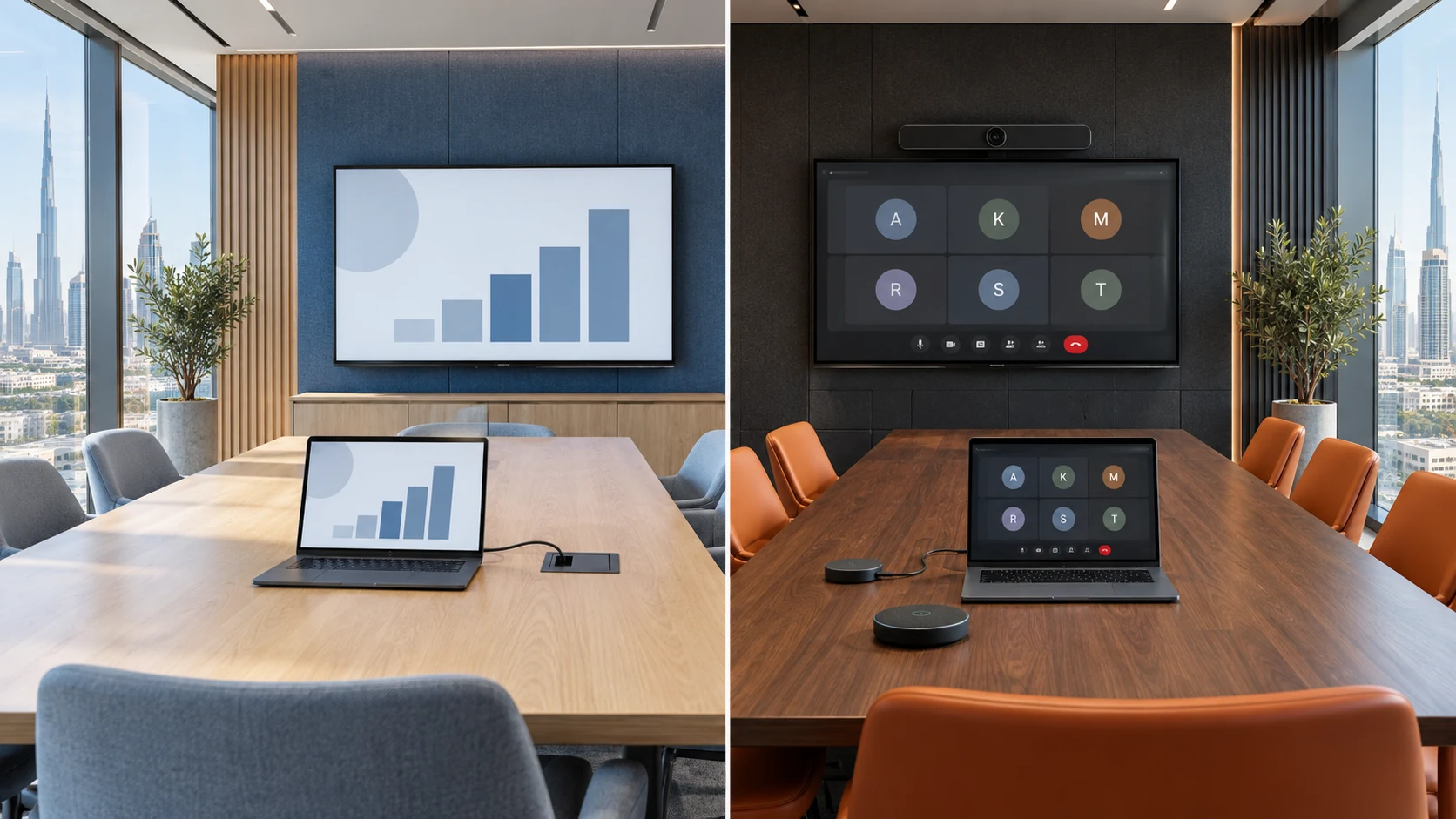
A byod meeting room allows employees to bring their own laptop into a meeting room and connect it to the room display and AV devices.
The meeting runs entirely from the user’s computer. Applications such as Microsoft Teams, Zoom, Google Meet, or Webex stay on the laptop, while the room simply provides a larger screen, camera, speakers, or microphone if available.
This model has become popular because employees already know how to use their preferred meeting software.
According to Microsoft, hybrid work continues to increase demand for meeting spaces that support personal devices alongside collaboration technology.
How a BYOD Meeting Room Works
A typical byod meeting room follows a simple workflow.
- Walk into the room.
- Connect a laptop using USB-C or HDMI.
- Launch Teams, Zoom, or another conferencing app.
- Share the screen.
- Start the meeting from the laptop.
The room itself does not control the meeting. Everything happens on the user’s device.
Typical Equipment in a BYOD Meeting Room
- USB conference camera
- Speakerphone or ceiling microphone
- Meeting room display
- Wireless presentation system
- USB-C docking solution
- HDMI connectivity
- Network connection
Benefits of a BYOD Meeting Room
- Lower deployment cost
- Easy user adoption
- Supports multiple conferencing platforms
- Simple installation
- Ideal for small meeting rooms
- Minimal IT administration
Limitations of BYOD
Despite its flexibility, BYOD also has some drawbacks.
Meeting quality depends heavily on the user’s laptop. Older devices may struggle with video processing, USB compatibility, or audio performance.
Common issues include:
- Cable compatibility problems
- Forgotten adapters
- Battery limitations
- Inconsistent camera quality
- Variable microphone performance
- Different user settings every meeting
These problems become more noticeable as meeting rooms become larger.
What Is BYOM?
BYOM, short for Bring Your Own Meeting, allows users to launch meetings from their own laptop while using the meeting room’s professional conferencing hardware.
Instead of relying on the laptop’s webcam and speakers, the laptop temporarily connects to enterprise-grade room equipment.
This gives employees the freedom to use any conferencing platform while still benefiting from higher-quality audio and video.
Many organizations comparing byod vs byom meeting room solutions discover that BYOM offers greater flexibility without requiring a dedicated Teams Room or Zoom Room deployment.
How BYOM Works
A BYOM system usually follows this process.
The employee walks into the room, connects a USB-C cable or wireless bridge, opens their preferred meeting application, and starts the meeting.
Instead of using the laptop’s camera and microphone, the application automatically detects the room’s devices.
The result is a meeting that feels familiar to the user while delivering much better audio and video quality.
Equipment Used in BYOM Rooms
- Intelligent conference camera
- Beamforming microphones
- DSP audio processing
- Ceiling or table microphones
- Room speakers
- USB connectivity hub
- Wireless BYOM bridge
- Touch-enabled room display
Why BYOM Is Becoming Popular
Companies are adopting BYOM because employees use multiple meeting platforms like Microsoft Teams, Zoom, and Google Meet. It eliminates dependence on a single room platform, supports hybrid collaboration, and allows organizations to upgrade existing meeting rooms without replacing all AV equipment.
Is BYOD the Same as BYOM?
No. BYOD vs BYOM describes two different meeting room approaches. A BYOD room depends primarily on the user’s laptop for conferencing.
A BYOM room still starts with the user’s laptop, but it hands over audio and video responsibilities to professional meeting room hardware.
That difference has a significant impact on meeting quality, ease of use, and long-term scalability.
For organizations planning future meeting room upgrades, understanding this distinction helps avoid buying equipment that only solves part of the problem.
How Does BYOD vs BYOM Compare?
The biggest difference in byod vs byom is where the meeting experience comes from. A BYOD setup relies mainly on the user’s laptop, while a BYOM room uses professional AV hardware for audio and video without forcing users to switch meeting platforms.
If your goal is occasional video calls in a small room, BYOD may be enough. If you want consistent meeting quality across different platforms, BYOM is usually the better choice.
BYOD vs BYOM Comparison Table
| Feature | BYOD Meeting Room | BYOM Meeting Room |
|---|---|---|
| Meeting platform | Runs on the user’s laptop | Runs on the user’s laptop |
| Camera | Laptop or basic USB camera | Professional room camera |
| Microphones | Laptop or USB device | Ceiling, table, or beamforming microphones |
| Speakers | Laptop or USB speakerphone | Dedicated room speakers |
| Video quality | Depends on the laptop | Consistent professional quality |
| Audio quality | Varies by device | Optimized for room coverage |
| User experience | Simple but inconsistent | Consistent across meetings |
| Room size | Best for small rooms | Small, medium, and large rooms |
| IT management | Minimal | Moderate |
| Expansion | Limited | Easy to upgrade |
| Best for | Budget-conscious offices | Hybrid collaboration environments |
Which Provides Better Meeting Quality?
BYOM generally delivers better meeting quality because it uses dedicated conferencing hardware instead of relying on the laptop.
A laptop webcam is designed for one person sitting close to the screen. In a meeting room, participants may be several meters away. That often leads to poor framing, weak audio pickup, and inconsistent sound.
Professional meeting room equipment is built for this environment.
Camera Performance
- Auto framing
- Speaker tracking
- AI-powered participant framing
- Optical zoom
- Wide field of view
Audio Performance
- Echo
- Background noise
- Uneven voice pickup
- Low speaker volume
- Ceiling microphones
- Table microphones
- Digital signal processors (DSPs)
- Echo cancellation
- Noise reduction
- Professional speakers
Which Is Easier for Employees to Use?
- Camera selection
- Microphone selection
- Speaker routing
- Display connection
Which Option Costs More?
- Display
- USB camera
- Speakerphone
- HDMI or USB-C connection
- Intelligent cameras
- Ceiling microphones
- Audio processors
- Wireless BYOM gateway
- Advanced room controllers
Example Cost Considerations
Although pricing varies by manufacturer and room size, the overall investment typically follows this pattern:
| Room Type | BYOD | BYOM |
|---|---|---|
| Small huddle room | Lower | Moderate |
| Medium meeting room | Moderate | Moderate to higher |
| Large boardroom | Often requires upgrades | Designed for this environment |
Which Meeting Room Sizes Suit Each Approach?
Small Huddle Rooms
- Speakerphone
- Single display
- USB-C docking
Medium Conference Rooms
- Wide-angle conference camera
- Ceiling microphone
- DSP
- Dual displays
Large Boardrooms
Large meeting rooms almost always benefit from BYOM.
Long tables, multiple presenters, and hybrid participants require equipment that captures voices evenly and keeps everyone visible.
Many organizations comparing byod vs byom meeting room solutions choose BYOM for executive boardrooms because it provides a more consistent experience for both in-room and remote attendees.
Can You Upgrade a BYOD Meeting Room to BYOM?
- Whether your current camera supports USB connectivity.
- If your microphone and speakers provide adequate room coverage.
- Whether your display supports modern USB-C or HDMI connections.
- If your network can support frequent video meetings.
What Hardware Is Needed for BYOM?
The exact hardware depends on room size, but every BYOM room needs reliable audio, video, and connectivity.
Unlike a basic byod video conferencing setup, BYOM relies on room equipment to deliver a consistent meeting experience regardless of the conferencing platform.
Essential BYOM Components
Conference Camera
- Wide field of view
- Auto framing
- Speaker tracking
- Optical zoom for larger rooms
- USB connectivity
Microphones
- Table microphones
- Ceiling microphones
- Wireless microphones
- Beamforming microphone arrays
Speakers
Dedicated room speakers help everyone hear remote participants clearly.
Many all-in-one conference bars include built-in speakers for small spaces, while larger rooms may require ceiling or wall-mounted speakers connected to a DSP.
USB Connectivity
- USB-C
- USB-A
- HDMI
- Wireless USB bridges
Wireless Presentation System
Many organizations also include wireless presentation technology so employees can share content without searching for cables.
This improves flexibility, especially in shared meeting spaces.
What Are the Security and IT Considerations?
Both BYOD and BYOM can be secure when properly managed, but each introduces different IT responsibilities.
A byod meeting room relies on employee devices, which means IT teams have less control over software versions, operating systems, and security settings.
BYOM shifts more responsibility to managed room hardware while still allowing employees to use their preferred meeting platform.
IT teams should consider:
- Device authentication
- Firmware updates
- USB access policies
- Network segmentation
- Software updates
- Room equipment monitoring
The National Institute of Standards and Technology (NIST) recommends following established guidance for device management and cybersecurity to reduce risks associated with connected workplace devices.
What Mistakes Should You Avoid When Choosing Between BYOD and BYOM?
The biggest mistake is choosing based only on initial cost instead of how the room will be used.
Meeting rooms are long-term investments. Saving money today can lead to poor user experiences and additional upgrade costs later.
Choosing Hardware That Doesn't Match the Room
A small USB speakerphone may work well in a four-person room, but it will struggle in a large boardroom.
Always size cameras, microphones, and speakers according to the room dimensions and seating capacity.
Ignoring Future Growth
Many businesses install equipment that meets today’s needs without considering future expansion.
If your company expects more hybrid meetings or additional offices, selecting hardware that supports upgrades can save money over time.
Focusing Only on Video
Video often receives the most attention, but poor audio causes more meeting disruptions.
Investing in quality microphones and proper speaker placement usually delivers a greater improvement than buying a higher-resolution camera.
Making Connection Too Complicated
Employees should not need several adapters or multiple cables just to start a meeting.
Simple USB-C or wireless connectivity encourages users to take advantage of the room’s technology instead of avoiding it.
How Do You Decide Between BYOD and BYOM?
The best choice depends on your meeting habits, room size, and collaboration requirements.
Ask these questions before making a decision.
Do Employees Use Different Meeting Platforms?
If teams regularly switch between Microsoft Teams, Zoom, Google Meet, and Webex, BYOM offers greater flexibility because users can continue using their preferred applications while accessing the room’s AV equipment.
How Often Are Video Meetings Held?
If video meetings happen only occasionally, a byod meeting room may be sufficient.
If meetings take place throughout the day, BYOM usually provides a better experience and reduces technical issues.
What Size Are Your Meeting Rooms?
Small rooms often work well with BYOD.
Medium and large rooms benefit from BYOM because professional cameras and microphones provide more consistent coverage.
Is User Experience a Priority?
Meeting delays often happen because users cannot connect quickly or the room hardware does not work as expected.
BYOM simplifies the process by allowing employees to launch meetings from familiar applications while using room devices automatically.
Decision Matrix
| Your Requirement | Recommended Solution |
|---|---|
| Lowest upfront cost | BYOD |
| Occasional meetings | BYOD |
| Small huddle rooms | BYOD |
| Mixed meeting platforms | BYOM |
| Better audio and video quality | BYOM |
| Medium meeting rooms | BYOM |
| Large conference rooms | BYOM |
| Frequent hybrid meetings | BYOM |
| Future scalability | BYOM |
Where Does Each Solution Work Best?
| Industry | Recommended Approach | Reason |
|---|---|---|
| Small businesses | BYOD | Lower setup cost and simple deployment |
| Corporate offices | BYOM | Better meeting quality across multiple rooms |
| Education | BYOM | Supports hybrid classrooms and guest devices |
| Healthcare | BYOM | Reliable communication with remote specialists |
| Government | Depends on security policies | Balance flexibility with managed devices |
| Professional services | BYOM | Better experience for client-facing meetings |
As hybrid work continues to grow, many organizations begin with BYOD and gradually transition to BYOM as meeting frequency, room utilization, and collaboration needs increase.
Final Thoughts
There is no single answer for every business. The right choice depends on how your teams work, the size of your meeting rooms, and the conferencing platforms you use every day.
If your organization has small meeting spaces, occasional video calls, and a limited budget, a byod meeting room is often the most practical starting point. It allows employees to use their own laptops and familiar meeting applications with minimal room hardware.
If your business relies on daily hybrid meetings, supports multiple collaboration platforms, or wants a more consistent meeting experience, BYOM is the stronger long-term investment. It combines the flexibility of personal devices with the performance of professional cameras, microphones, speakers, and displays.
When comparing byod vs byom, think beyond the purchase price. Consider user experience, future growth, IT management, and how often your meeting rooms are used. A solution that works well today should also support your collaboration needs over the next several years.
Before purchasing new equipment, review how your current meeting rooms are being used. You may find that a simple upgrade is enough to improve audio quality, simplify connectivity, and make meetings easier for everyone, whether they are in the room or joining remotely.
Frequently Asked Questions
What is the main difference between BYOD vs BYOM?
The main difference is how the meeting room handles audio and video. In a byod meeting room, the user’s laptop controls the meeting and often provides the camera, microphone, and speakers. In a BYOM room, the user still starts the meeting from their laptop, but the room’s professional AV equipment handles the audio and video.
Is a BYOD meeting room suitable for hybrid meetings?
Yes, a byod meeting room can support hybrid meetings, especially in smaller spaces. However, as room size and the number of remote participants increase, dedicated room cameras and microphones found in BYOM systems usually provide a better experience.
Can I use Microsoft Teams, Zoom, and Google Meet in a BYOM room?
Yes. One of the biggest advantages of BYOM is platform flexibility. Employees can use Microsoft Teams, Zoom, Google Meet, Cisco Webex, or other supported applications while taking advantage of the room’s camera, microphones, speakers, and display.
Is BYOM more expensive than BYOD?
The initial investment is usually higher because BYOM includes professional meeting room hardware. However, many businesses find that the improved meeting quality, fewer technical issues, and longer equipment lifespan provide better long-term value.
Can an existing byod meeting room be upgraded to BYOM?
In many cases, yes. Existing displays, USB cameras, speakers, and other AV equipment can often be reused. Adding a BYOM gateway, USB switching solution, or upgraded audio system is usually enough to support a BYOM workflow without rebuilding the entire room.